
Disney Solitaire: Ultimate Guide for MAC Users
Dive into the enchanting world of Disney Solitaire, where the timeless charm of classic solitaire meets the magical realms of Disney. Adorned with stunning artwork, soothing melodies, and beloved characters, this game offers a delightful and laid-back card-playing experience. For those who crave a larger screen and enhanced controls, playing Disney Solitaire on a MAC device is the perfect solution. Utilizing BlueStacks Air, a lightweight Android app platform designed for MAC, you can effortlessly set up Disney Solitaire for an enriched gaming experience. This guide will walk you through the simple process of getting Disney Solitaire up and running on your MAC, ensuring you enjoy a smoother and more engaging playtime.
Enjoy the Classic Solitaire with a Disney Twist!
One of the key benefits of playing Disney Solitaire on a MAC is the ability to use a keyboard and mouse, providing precise control and simplifying routine card-flipping tasks. During our playtest on a MacBook, we discovered that the game is remarkably user-friendly. It's ideal for playing on the go—whether you're commuting on a metro or simply taking a break. The casual gameplay is further enhanced on a MAC, thanks to its vibrant and crystal-clear 4K Retina display.
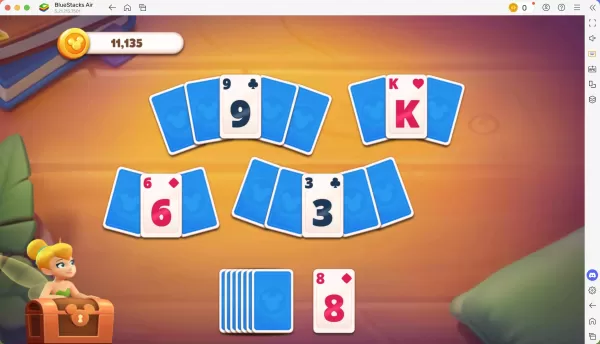
Progress Further with Precise Controls!
As you conquer each level, you're awarded a star, which you can use to unlock new cutscenes and characters, enriching the game's narrative. When playing on a MAC with BlueStacks Air, you can customize individual controls for various actions. BlueStacks comes with preset controls tailored for each game, including Disney Solitaire. To view these controls, press SHIFT + TAB on your Mac keyboard. If the defaults don't suit you, feel free to tweak them to your preference. You can craft your own control schemes and assign different keys to specific in-game activities.
How to Install and Start Playing Disney Solitaire on BlueStacks Air
Follow these straightforward steps to begin your Disney Solitaire adventure on your Mac:
- Download BlueStacks Air: Head over to the game's page and click the "Play Disney Solitaire on MAC" button to download the installer.
- Install BlueStacks Air: Double-click the BlueStacksInstaller.pkg file and follow the on-screen wizard to complete the installation.
- Launch and Sign-In: Open BlueStacks Air from the Launchpad or Applications folder. Sign in with your Google account to access the Play Store.
- Install Disney Solitaire: Search for Disney Solitaire in the Play Store and install it.
- Enjoy the Game! Launch the application and embark on your nostalgic journey through the Disney multiverse!
-
 Red Bull is elevating its passion for extreme sports with Red Bull Playgrounds, a dynamic title that combines BMX, skateboarding, and parkour into one imaginative experience. Now available globally, it delivers non-stop urban athletic action—no helmeAuthor : Aaron Dec 20,2025
 -
 The second anniversary update for Snowbreak: Containment Zone is here, packed with giveaways, new characters, and fresh game modes! Discover what this major milestone brings to the game.Snowbreak Concord Ode Update Delivers Special Codes, Free 5-StarAuthor : Elijah Dec 20,2025

















- Spring Valley Farm Game: January 2025 Redeem Codes
- WWE Superstars Join Call of Duty Warzone: Mobile Roster
- Midnight Girl is a minimalist point-and-click adventure set in Paris in the 60s, now open for pre-orders on mobile
- Mobile Legends: Bang Bang – Best Lukas Build
- "Grand Outlaws Unleashes Chaos and Crime on Android Soft Launch"
- Video Game Song Surpasses 100 Million Streams on Spotify